 A free menu bar app for your Mac
Squeak.
Decide what every extra button on your mouse does, without installing the maker's software.
brew install --cask viaductindustries/tap/squeak 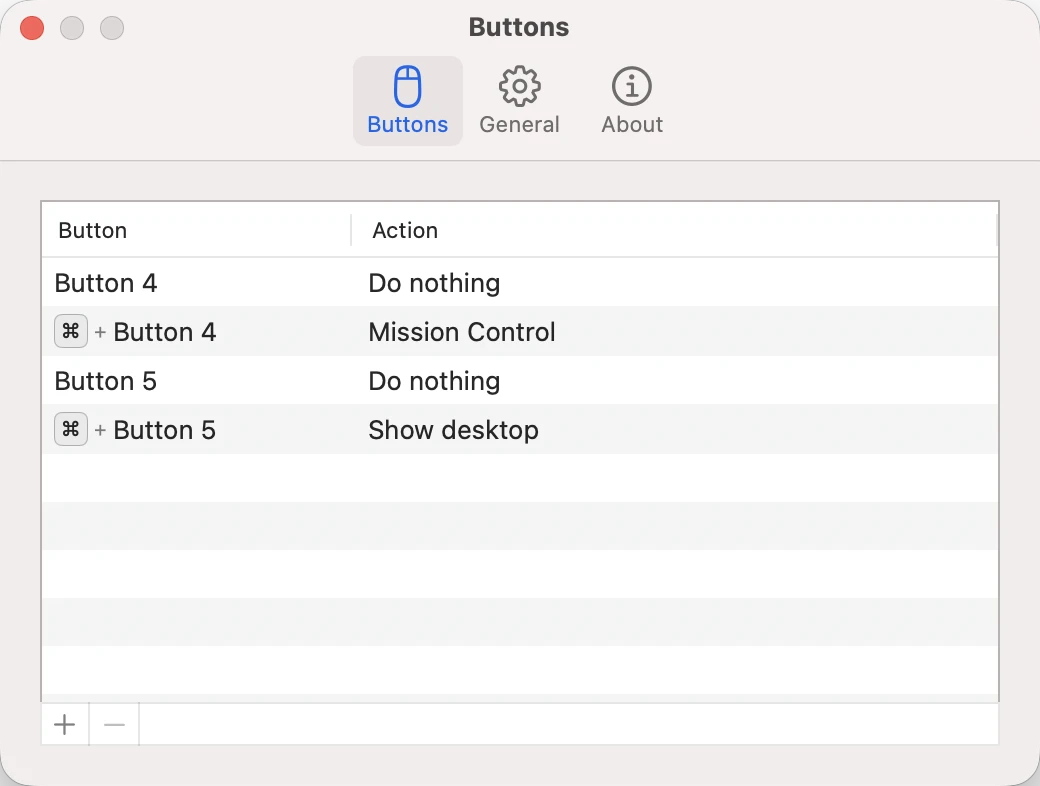
- Runs on
- macOS 15 or later
- Lives in
- The menu bar
- Needs
- Accessibility access
- Costs
- Nothing
Why it's useful.
Most mice have more buttons than macOS knows what to do with. The middle button opens links in new tabs, the side buttons go back and forward in your browser, and that's about it.
To change that, you're usually sent to the mouse maker's own software. It's often huge and full of things you don't need, and plenty of mice don't have any for macOS at all.
Squeak is one small menu bar app that works with any mouse. Press a button, choose what it should do, and you're done: a keyboard shortcut, Mission Control, an app, or nothing at all.
How it works.
-
Install it
Open Squeak and allow it Accessibility access when macOS asks. It stays in the menu bar from then on.
-
Press +
Squeak waits for you to press a mouse button, noting any of ⌘ ⌥ ⌃ ⇧ you're holding.
-
Pick an action
Choose what that button does. Select a row to change it, or press − to hand the button back to macOS.
What it does.
Any mouse
No driver and no maker's software. If macOS sees the button, Squeak can change what it does.
Keyboard shortcuts
Turn a button into any key combination, held down for as long as you hold the button.
Modifier combinations
⌘ + Middle can do something different from a plain middle click. Keys without a row of their own fall back to the plain button.
Pass to other apps
Ignore a button over browser windows but keep it everywhere else, for push-to-talk or game bindings.
macOS gestures
Mission Control, App windows, Show desktop, and moving to the previous or next desktop.
Open an app
Open or switch to any app from a single button.
Example uses.
See every window
⌘ + Middle → Mission ControlOne click to see everything that's open, while a plain middle click still opens links in new tabs.
Copy and paste
Button 4 → ⌘C · Button 5 → ⌘VMove text around without taking your hand off the mouse.
Push-to-talk
Button 5 → Pass to other appsDiscord still sees the button. Your browser doesn't.
Clear the desk
⌥ ⇧ + Middle → Show desktopHold two keys and click to push every window aside.
Requirements
- A Mac running macOS 15 Sequoia or later — Apple silicon or Intel.
- Accessibility access, under System Settings › Privacy & Security › Accessibility. Squeak asks for it the first time it opens.
- A mouse with a middle button or extra buttons. Left and right clicks are never touched.
Install Squeak
Install Squeak from our tap:
brew install --cask viaductindustries/tap/squeak To update it later:
brew update
brew upgrade --cask viaductindustries/tap/squeak Download the latest ZIP from GitHub Releases, unzip it and drag Squeak to Applications. It's the same build as Homebrew's, signed and notarized by Apple.
You'll need Xcode 26 or later. Then build it, copy it to Applications and open it:
git clone https://github.com/viaductindustries/squeak.git
cd squeak
scripts/build-app.sh --install It's signed with your Apple Development certificate if you have one, so Accessibility access survives rebuilds.
Squeak lives in the menu bar, with no Dock icon. Its menu has Settings… and Pause, which hands every button back to macOS until you turn it off.
Questions.
- Why does it need Accessibility access?
- That's how macOS lets an app see mouse buttons before other apps do. Squeak only asks to see the middle and extra buttons, never your typing, and it doesn't connect to the internet.
- How do I uninstall it?
- Choose Quit Squeak from its menu and move it to the Bin, or run
brew uninstall --cask squeakif you installed it with Homebrew.
Deliberately small.
Squeak only handles the middle and extra mouse buttons. It never touches left and right clicks or scrolling, and a button with no row behaves just as it would without Squeak. That's the whole job.